
Skip to content
Free Excel Tutorials
  • Home
  • Excel For Beginners
  • Excel Intermediate
  • Advanced Excel For Experts

Data Analysis

  • How to calculate correlation coefficient Correlation in Excel
  • Error Bars in Excel
  • Randomize/ Shuffle List in Excel
  • How To Insert and Customize Sparklines in Excel
  • Understanding Anova in Excel

References

  • Approximate match with multiple criteria in Excel
  • Lookup entire row in Excel
  • How to get first column number in range in Excel
  • How to use Excel MMULT Function
  • VLOOKUP function: Description, Usage, Syntax, Examples and Explanation

Data Validations

  • Excel Data validation whole percentage only
  • Excel Data validation allow weekday only
  • Excel Data validation number multiple 100
  • Excel Data validation date in specific year
  • Excel Data validation only dates between

Excel Data validation allow weekday only

by

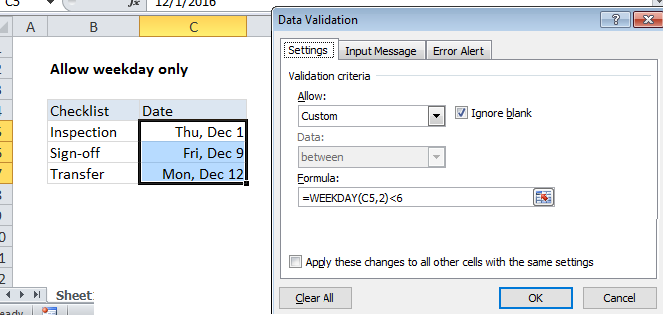
Using the example below, this tutorial shows how to use Excel Data validation allow weekday only.

Formula

=WEEKDAY(A1,2)<6
Explanation

Note: Excel has several built-in data validation rules for dates. This page explains how to create a your own validation rule based on a custom formula if you need more control or flexibility.

To allow a user to enter only dates that are weekdays (i.e. Monday, Tuesday, Wednesday, etc.) you can use data validation with a custom formula based on the WEEKDAY function.

In the example shown, the data validation applied to C5:C7 is:

=WEEKDAY(C5,2)<6

How this formula works

Data validation rules are triggered when a user adds or changes a cell value.

This custom validation formula uses the WEEKDAY function to get a numeric value, 1-7, corresponding to to a week beginning Monday (1) and ending Sunday (7). To get a number for a Monday-based week, the return_type argument for WEEKDAY is provided as 2.

The WEEKDAY result is then compared to 6. Any value less than 6 is a weekday, so the expression returns TRUE and validation succeeds. If the weekday number is not less than 6, validation fails because the date is a Saturday or Sunday.

Date is weekend

To allow only dates that occur on a weekend (Saturday or Sunday), you can use a similar formula:

=WEEKDAY(C5,2)>5

Note:  Cell references in data validation formulas are relative to the upper left cell in the range selected when the validation rule is defined, in this case C5.

Post navigation

Previous Post:

COSH function: Description, Usage, Syntax, Examples and Explanation

Next Post:

Excel Data validation require unique number

Leave a Reply Cancel reply

Your email address will not be published. Required fields are marked *

Learn Basic Excel

Ribbon
Workbook
Worksheets
Format Cells
Find & Select
Sort & Filter
Templates
Print
Share
Protect
Keyboard Shortcuts

Categories

  • Charts
  • Data Analysis
  • Data Validation
  • Excel Functions
    • Cube Functions
    • Database Functions
    • Date and Time Functions
    • Engineering Functions
    • Financial Functions
    • Information Functions
    • Logical Functions
    • Lookup and Reference Functions
    • Math and Trig Functions
    • Statistical Functions
    • Text Functions
    • Web Functions
  • Excel VBA
  • Excel Video Tutorials
  • Formatting
  • Grouping
  • Others

Logical Functions

  • How to use IFS function in Excel
  • How to use Excel XOR Function
  • How to use Excel TRUE Function
  • How to use Excel FALSE Function
  • OR function Examples in Excel

Date Time

  • How to get workdays between dates in Excel
  • Convert date to text in Excel
  • How to calculate project start date based on end date in Excel
  • TIME function: Description, Usage, Syntax, Examples and Explanation
  • Series of dates by day

Grouping

  • Group numbers at uneven intervals in Excel
  • Map text to numbers in Excel
  • Group numbers with VLOOKUP in Excel
  • Group arbitrary text values in Excel
  • Categorize text with keywords in Excel

General

  • How to calculate profit margin percentage in Excel
  • How to Insert Cells, Row and Rows in Excel
  • Basic error trapping example in Excel
  • 231 Keyboard Shortcut Keys In Excel
  • Spell Check in Excel
© 2025 xlsoffice . All Right Reserved. | Teal Smiles | Abbreviations And Their Meaning